
Appearance
Re-Allocate Postings
There may be circumstances where you need to move whole or part of a transaction to another. With the Re-Allocate Postings option, you have the power to:
Seamlessly relocate a payslip to a different invoice.
Swiftly transfer the payment to another invoice
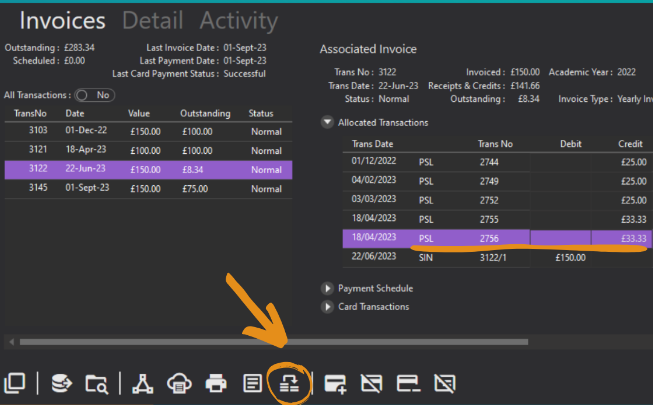
To access this:
Open a contact record and go to the Debtor tab.
Click on the Invoices option and select the invoice you need.
Expand the Allocated Transactions view and click on the payment causing the issue.
At the bottom, click on the re-allocate postings icon (pictured above).
Choose whether to move the payslip, or transfer the funds and select the invoice you want to allocate it to.
Save the allocation.
Save the contact card.
Not the same as Move Allocation
This moves a payment onto a different invoice. To change which invoice an automatically transferred overpayment pays, use Move Allocation instead.