
Appearance
What the application asks
An application on the Portal asks a family only what you have turned on. Every question below is optional for a service, most are off until you want them, and a few bring follow-up questions with them.
The switches are not all in one place, which is the main reason this page exists: the field reference lists each setting, but nothing joins a setting to the question a parent actually sees.
The questions, and what turns each one on
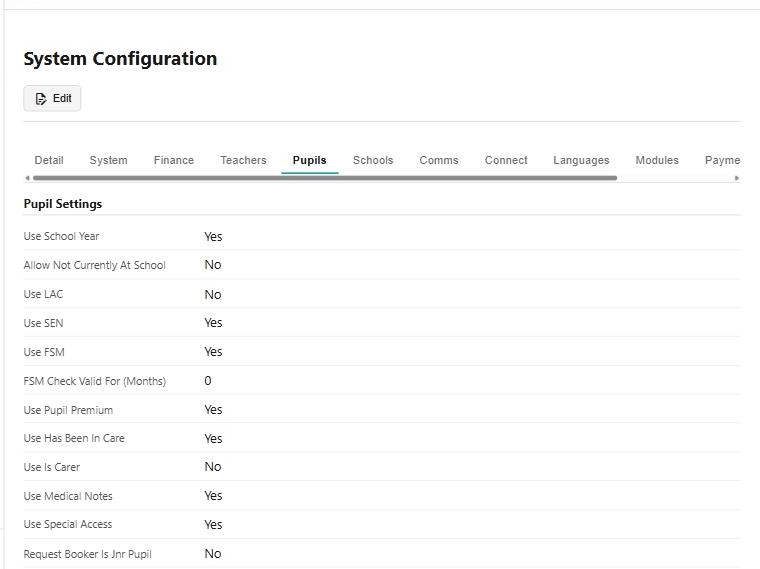
All but two are in System Configuration, spread across three of its tabs.
| The family is asked | Turned on by | Tab |
|---|---|---|
| Ethnicity | Use Ethnic Groups | System |
| Nationality | Use Nationality | System |
| Pronouns | Use Pronouns | System |
| School year | Use School Year | Pupils |
| Has the pupil been in care? | Use Has Been In Care | Pupils |
| Is the pupil a carer? | Use Is Carer | Pupils |
| Is the pupil a looked after child? | Use LAC | Pupils |
| Does the pupil have special educational needs? | Use SEN | Pupils |
| Free school meals | Use FSM | Pupils |
| Pupil premium | Use Pupil Premium | Pupils |
| Medical notes | Use Medical Notes | Pupils |
| Special access needs | Use Special Access | Pupils |
| Which school? | Use Pupil Schools | Schools |
| Doctor's details | Requires Doctor Details | on the service type |
| A detailed medical form | Detailed Medical Form | Portal Parameters |
Turn one off and the question goes; what has already been answered stays on the record.
The questions that unfold
Three of them lead somewhere when they are answered a particular way, which is worth knowing before you decide whether to ask at all.
Gender and ethnicity can be self-described. Where the list you offer includes a self-identify option, choosing it opens a free-text box — "How do you identify?" — instead of forcing somebody into a category that does not fit.
Pronouns can be spelled out. The pronoun list can include a let me specify option, and choosing it opens four boxes for the subjective, objective, possessive and reflexive forms — he, him, his, himself — so the family gives the exact words rather than picking the nearest pair.
Been in care opens a second question. Answering yes reveals Time in care, for how long.
Your own consent questions
Alongside the questions above, Settings > System Configuration > Pupils carries up to six consent questions of your own. Each one has:
- a label, which is what the answer is filed under — Photo/Video, say
- a question, which is the sentence the family reads and agrees to or does not: "I consent to … photographing or recording this participant for promotional use."
- a service type or category group, so a consent can be asked only where it applies
- whether an adult applicant is asked it too
The ones that depend on age
Some questions are not switched on or off but decided by the pupil's age, using the ages you have set:
- The pupil's own email and mobile are only asked above your Minimum Age For Contact Info. Below it, the family's contact details are the only ones taken.
- The carer question is only asked about a child.
- Date of birth can be required of an adult applicant separately.
- Child Responsibility Age comes into play where you use Share Info, for deciding what a young person may see and agree to themselves.
The wording is yours
The gender and pronoun questions are not fixed text: Gender Question and Pronoun Question on Portal Parameters let you word them as your service would. That matters more here than on most screens — these are the questions families are most likely to notice, and the phrasing is the part you control without changing what is collected.
Before you turn one on
Everything above is personal information, and some of it is special category data. Two practical points:
Ask for what you will use. A question that is on is asked of every applicant and stored against the pupil. If nothing in your reporting or your statutory return needs it, the kindest setting is off.
The family sees it again. These answers appear on the pupil's own record in the Portal, where a parent can see and correct what was given. They are not a one-way form.
See also
- Making an application — the family's side, step by step
- System Configuration — each Use setting, with its own description
- Portal Parameters — the gender and pronoun wording, and the detailed medical form
- Gender Types — the list of genders, and which entry self-identifies
- CRM — ethnic groups, relationship types and the rest of the lists these questions draw on