
Appearance
Posting against an invoice
Every movement of money on a payer's account is posted against an invoice: a payment, a credit, a write-off, a refund. This page is what each of the posting tools does, what it refuses, and which of them cannot be undone.
Where the tools are
Pick an invoice — or anything posted against one — and the tools appear beside it. That works from four places, and they behave identically:
- the payer's Invoices tab
- the payer's Ledger tab, where picking any row opens the invoice it belongs to
- an activity's Finance tab
- Manage Invoices
Post Invoice is the exception: it is on the payer's own tab only, because a manual invoice needs a payer to raise it for.
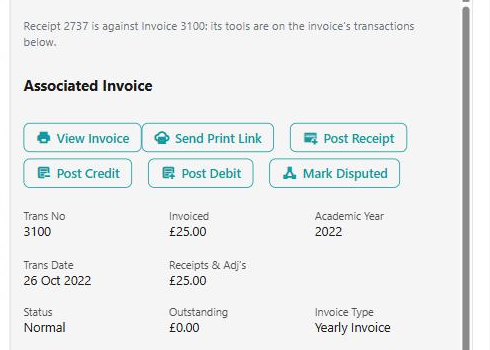
Picking something that is not an invoice tells you where its own tools are instead — "Receipt 2737 is against Invoice 3100: its tools are on the invoice's transactions below."
What each row offers follows what the server will allow — but the server checks again when you confirm, and says why when it refuses. A tool you can see is not a promise that the posting will go through.
Taking a payment
Post Receipt puts a payment against the invoice, and offers what is outstanding by default. It wants to know how it was paid — cash, cheque, card or other — and, where the invoice has a payment schedule, what the schedule should do about a part payment:
| Choice | What it does |
|---|---|
| Change Next | The next instalment absorbs it |
| Change Last | The final instalment absorbs it |
| Change All | Every remaining instalment is adjusted |
An overpayment refunds itself
Post more than the invoice owes and the extra does not sit on the account: a refund is raised for it automatically, and the message after the posting tells you so. That refund then waits for approval like any other.
Credits, debits and write-offs
Post Credit and Post Debit are adjustments against an invoice line, not against the invoice as a whole. Where the invoice has more than one line you are asked "Invoice 1041 has 3 lines - which is it for?" before anything is posted. VAT follows that line's rate.
That question is worth answering carefully. A credit against the wrong line is right in total and wrong in every report that reads by line.
Write Off clears what is left on the invoice, and asks plainly first: "Write off the £42.50 left on invoice 1041?"
A big credit waits for somebody
Where your service authorises credits, a credit over the write-off limit does not post straight away — it becomes a pending item for the approvals task, and the message says so: "It is waiting for approval (Tasks)." It has not failed and it should not be posted again.
Giving money back
Request Refund raises a refund against a receipt. It is a request: it stays pending until somebody pays it out through the Refund Approvals task.
It offers no more than is left of that payment — the receipt less anything already refunded or already requested — so a second refund of the same payment is refused rather than allowed and sorted out later.
Returned Receipt is the different thing people reach for by mistake: it records that a payment came back, and takes it off the invoice. "Receipt 88 (£60.00) came back? A returned receipt takes it off the invoice." A receipt can only come back once.
Moving a payment to a different invoice
Move Allocation sends a credit the ledger put against one invoice to another of the payer's invoices — all of it, or part, with the rest left where it is.
Only invoices that still owe something are offered, and never for more than they owe. One kind of invoice is deliberately left out of the list, with a reason worth knowing:
"That invoice is collected by a different payment schedule for a different kind of invoice, which would take the money again by direct debit."
So an invoice missing from the list is usually not an oversight — moving money onto it would have had the schedule collect it a second time.
Re-pricing a line
Recalculate prices an invoice line again from its activity as it stands now, and shows the new figures beside the ones the line holds before you commit to anything. It works on tuition, group membership, hire and tuition subsidy recharge lines.
Recalculate does not change the pricing
It applies the activity's pricing as it is. If the rate, discount, remission or bursary is what is wrong, change the activity first and then recalculate — doing it the other way round just re-applies the same wrong figures.
Edit Invoice Line changes the line's narrative and ledger code, and nothing else. Values are never edited: they are credited, debited or recalculated.
Raising an invoice by hand
Post Invoice builds a manual invoice: a heading, the academic year (and term, for a termly one), and one or more lines. Each line takes a service type that invoices this way, a ledger code — the service type's own, by default — VAT, an amount, and any discount, remission or bursary.
The figures are priced by the server as you enter them, using the activity's own fee calculation, so the total you are shown is the total that posts.
Each line is checked on its own and the message names the line: "Line 2: choose a service type that invoices this way", "Line 2: the discount must be between nothing and the amount".
An invoice's status
Mark Disputed moves it round a cycle of three: Normal → Disputed → In Review → Normal. Only those three can be changed, and if somebody else has moved it while you were looking you are told rather than overruling them: "The invoice's status has just been changed by someone else - look again."
Deleting, and what cannot be deleted
Delete takes a transaction off the ledger for good, and says so: "Delete receipt 88 (£60.00)? It comes off the ledger for good." Three things stop it, and each is deliberate:
| What you see | Why |
|---|---|
| "Deleting transactions is switched off (Configuration > Allow Transaction Deletion)." | Your service does not allow it at all |
| "A card payment can't be deleted - refund it instead." | The money really moved. Deleting the record would not bring it back |
| "This adjustment has gone to the finance export, so it can't be deleted." | It has already been reported to your finance system |
Only a receipt, credit, debit, journal or pending refund can be deleted at all. A refund that has been paid out cannot be, and nor can it be put back to pending once any of it has been paid.
Reject is the gentler option for something pending: "It stays on the invoice as Rejected and doesn't count." It can be put Back to Pending afterwards if it was rejected in error.
What it refuses, and what each one means
| What you see | What it means |
|---|---|
| "Nothing is outstanding on this invoice." | It is already settled — look for the payment rather than adding one |
| "Only £18.00 is left to credit on that invoice line." | The line has been credited before |
| "Nothing is left of this payment (£60.00) to refund." | It has been refunded, or a refund of it is already waiting for approval |
| "Receipt 88 has already been returned." | A payment can only come back once |
| "The date cannot be in the future." | Postings are dated today or earlier |
| "Only a Normal, Disputed or In Review invoice can have its status changed." | A cancelled or written-off invoice has no status to cycle |
| "Part of this refund has already been paid out, so it can't go back to pending." | Money has moved. This one is a ledger job |
| "This contact isn't a debtor." | The contact has no account to post against |
See also
- Debtors — the payer's account, its tabs and what each one is for
- Refunds — giving money back, and why a refund does not reduce what was charged
- A payment is not on the account — working out whether anything needs posting at all
- Giving a payer their money back — refund, credit or write-off, and which you want
- Payment Schedules — the schedule a part payment changes