
Appearance
A teacher's Dashboard
The Dashboard tab on a teacher answers two questions: what is their week, and is their contract the right size?
Where to find it: Contacts > a teacher > Dashboard
It is read only. Everything on it is worked out from the diary, the contract and the pay claims — there is nothing to change here, only something to act on somewhere else.
Highlights: one week
The week's activities with their times, and three things it draws attention to.
Overlaps. An activity that runs into another is marked, and the row says what it clashes with and by how long — "overlaps Brass at Ambridge Grammar by 15 minutes". The summary counts them, so a double-booked week announces itself.
Past activities with no result. Anything earlier in the week that has not been given an outcome is counted. This is the register chase in miniature, a teacher at a time.
Time on each contract. The week's lessons are added up against each contract the teacher holds. Where they are salaried and your service uses teacher contracts, it also shows the FTE that week's lessons come to beside the FTE allocated — and marks it when the two part by more than a hundredth.
Contract: one year, week by week
Choose a contract from the list — the primary one is marked — and step to the academic year you want, and you get its 53 weeks, from the Sunday on or before the year starts, with three figures against each: Scheduled, Contract and Claimed, plus the FTE for the first two.
Contracted Weeks and Directed Time come from the contract's year, and the three totals sit at the foot.
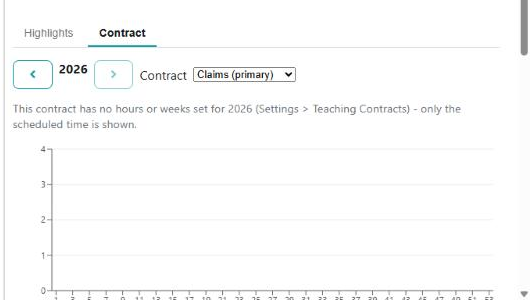
Nothing to compare with
If the contract has no year set up for the one you have chosen, you are told where to put that right rather than shown an empty comparison:
"This contract has no hours or weeks set for 2026 (Settings > Teaching Contracts) - only the scheduled time is shown."
The scheduled time is still drawn, because that comes from the diary. It is the contracted side that has nothing behind it.
What the three times actually mean
They are close enough to be confused and different enough to matter.
| Figure | What it counts |
|---|---|
| Contract time | The lesson as it stands: its length, plus its break where your service pays for breaks |
| Scheduled time | The same, but from the lesson's planned time and length — and its own length where there is no planned one |
| Claimed time | What the teacher has actually claimed through their pay claims |
So Scheduled against Contract is "what we planned against what is in the diary", and Claimed against either is "what the teacher says they did".
Breaks only count where you pay for them
A break is time the teacher is at the school and not teaching. It is added to these figures only where Teacher Breaks Are Paid is on. If your totals look short against what a teacher believes they are owed, that setting is the first place to look.
The advice when scheduled and contracted time part
If the two totals differ by more than one per cent and there are weeks still to come, the screen does the arithmetic for you:
"There is a difference between Scheduled and Contracted time. To correct this you should change the time on this contract as from March to 285 minutes a week. This will require an FTE of 0.317."
That figure is not the difference — it is the weekly time that would close the gap over the weeks that are left. Change the contract from the month it names and the year comes out even.
It only appears while there is still time to act. Late in a year, with no weeks remaining to spread the difference over, the advice stops being offered and the difference is a matter for the pay run rather than the contract.
See also
- A teacher's contract is not right — the contract itself, its weeks and the basis that decides whether you see FTE
- Teachers — pay approval, and the lists that work across everybody
- Teacher Pay — where claimed time comes from
- Pupil missing from a register — the outcomes behind "past activities with no result"