
Appearance
Services
The Services menu is where you set up what your service offers — the tuition, groups, events, auditions and everything else people apply for.
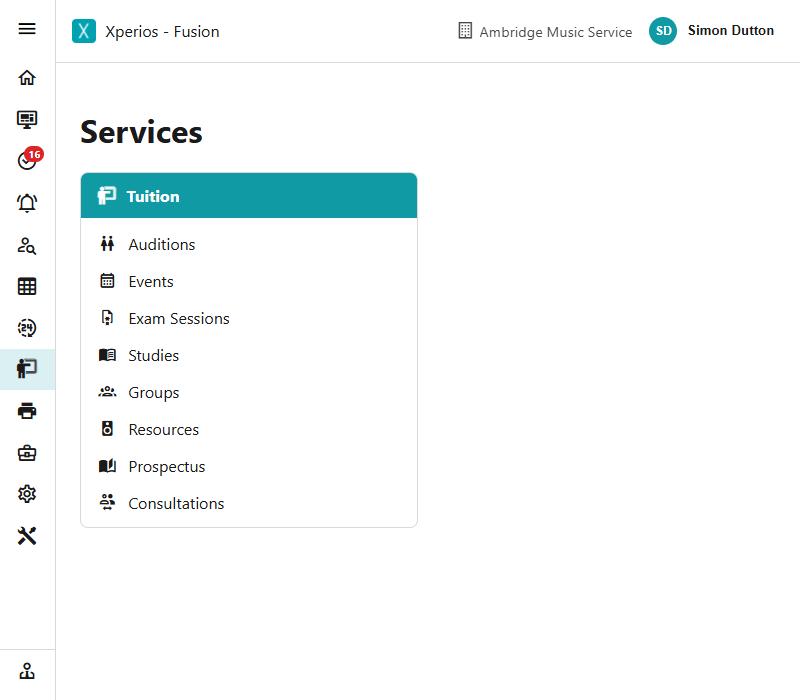
These are the things themselves. Who is taking them, what they are charged and how they are going is handled elsewhere; this is where each one is defined.
What is here
The menu groups these under a heading called Tuition — everything here is part of what you teach. Tuition itself is run from elsewhere; this is where the things people apply for are defined.
| Auditions | Auditions people apply for and attend |
| Events | One-off bookable events with a capacity |
| Exam Sessions | Sittings pupils are entered for |
| Studies | A programme of core and elective subjects over a fixed period |
| Groups | Ensembles, orchestras, bands and choirs |
| Resources | The instruments and equipment you own |
| Prospectus | What you offer each school, organisation and family |
| Consultations | Meetings with parents |
They all work the same way
Every screen here is a record card: a list on the left, the chosen record on the right.
Add starts a new one and fills in sensible defaults — the current academic year and its dates, the first service type of the right kind with its ledger code, a VAT code, and the next code in sequence. You change what does not suit.
Save checks the record before writing it. Most want at least a name, a code made of letters, digits and dashes, a service type of the matching kind, and an end date that is not before the start.
Set the Service Type up first
Each of these needs a Service Type of its own kind to exist — an Events service type for an event, a Group Membership one for a group. Add refuses rather than creating something that cannot be saved.
See Activity settings.
Deleting one
Anything in use is archived rather than deleted. Archiving takes it out of the lists people pick from while leaving everything that refers to it intact — the applications, the invoices, the history.
Something never used can be deleted outright.