
Appearance
Direct Debits
Where a service collects by Manual Direct Debit — you hold the mandates and send a file to your own bank each month, rather than a card provider taking the money — this is the screen that does it.
Where to find it: Business Management > Debtors > Direct Debits List
If your payment provider is something else, this screen is not the one you want; card collections live in the Card Schedule Manager.
What the list shows
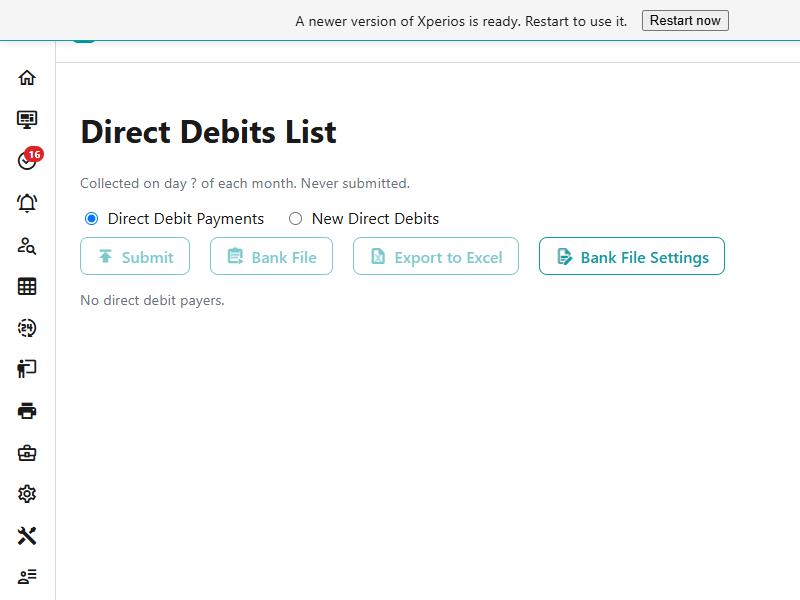
The line under the heading is the state of the month: which day collections are taken on, and when the last submission went. A question mark where the day should be means it has not been set, and nothing can be submitted until it is.
Every payer who has a direct debit — an amount above nothing and a start date — with this month's state against each: what will be taken, what was submitted and when, and the last receipt posted. The foot of the list totals it.
A payer with a mandate but no amount, or no start date, is not on it. That is the first thing to check when somebody is missing.
The month's routine
It is two steps, in this order, once a month.
1. Submit. This stamps every payer not yet submitted this month with the amount to take and the direct debit day, and posts their receipts to the ledger. After it, the ledger already shows the money as received.
2. Take the file. With Direct Debit Payments chosen, Bank File gives you the payers submitted this month at the amount they were submitted for, and that is what goes to the bank. It downloads as a text file named for the day it was taken.
Submit first, then the file
The payments file is built from what has been submitted, not from what is due. Download it before submitting and you get "No payer has been submitted this month - Submit first." — which is the system keeping the file and the ledger in step rather than being awkward.
Xperios will not let the same month go twice: a second attempt is refused with the date the first one went, "This month's direct debits were submitted on 03 Nov 2026."
New direct debits
New Direct Debits, the other choice beside Direct Debit Payments, is the other half: the payers who have never been submitted. Bank File then gives you their file instead, at their direct debit amount.
This matters because of how BACS treats a first collection. A payer with no direct debit receipt since their mandate started is a first collection and goes out with transaction code 01; everybody else is 17. First collections are written at the end of the file.
Bank File Settings
The file is BACS Standard 18, and the details identifying you on it are kept here rather than anywhere in the bank's own system:
| Field | What it is |
|---|---|
| Service user number (SUN) | Six digits — your identifier with BACS |
| Sort code and Account number | The account the money is collected into |
| Contra sort code and Contra account number | The account on the contra, or balancing, record |
| Service user name | Up to 18 characters, as it appears on the payer's statement |
| Reference prefix | Up to 13 characters. Each payment's reference is this, then the last five characters of the payer's own direct debit reference |
The reference prefix is how payments are recognised
It is the part of the reference you choose, and it is the same on every payment. The payer's own reference supplies the rest, which is what tells two payers apart on your bank statement.
Two settings live elsewhere, under System Configuration > Payment Methods: the day of the month collections are taken, and the first month of the year they start. Submitting is refused until the day is set.
What it refuses, and what each one means
| What you see | What it means |
|---|---|
| "Set the day of the month direct debits are taken (Configuration > Payment Methods) first." | Nothing can be submitted until that day exists — it is the date stamped on every payer |
| "This month's direct debits were submitted on 03 Nov 2026." | This month has gone already. The file is still available |
| "No payer has been submitted this month - Submit first." | You asked for the payments file before submitting |
| "No payer is waiting for a first submission." | The new file has nobody to put in it — everyone has been collected from before |
| "Fill in the bank file settings (service user number, sort codes, accounts, user name) first." | The file cannot identify you, so it cannot be written |
| "The service user number is 6 digits." | Exactly six |
| "A sort code is 6 digits." and "An account number is 8 digits." | Both of them, originating and contra |
| "The service user name is 1 to 18 characters." | It has to fit the BACS record |
| "The reference prefix is at most 13 characters (the payer's reference fills the rest)." | The reference is a fixed width, shared between the two parts |
| "This database doesn't have the bank file settings yet (they arrive with the next database Publish)." | The settings have not reached your database. Nothing to fix at your end — tell Paritor |
See also
- Debtors — the payer's account, and where a direct debit is set on it
- Payment Schedules — collecting by card instead, and the Card Schedule Manager
- A payment schedule is not collecting — the card side of the same question
- System Configuration — the direct debit day, first month and mandate form link
- Posting against an invoice — what Submit posts, and how to put a collection right afterwards