
Appearance
Settings
Settings is where the lists Xperios works from are maintained — your terms and holidays, your charges and ledger codes, the subjects you teach, the categories you classify schools by.
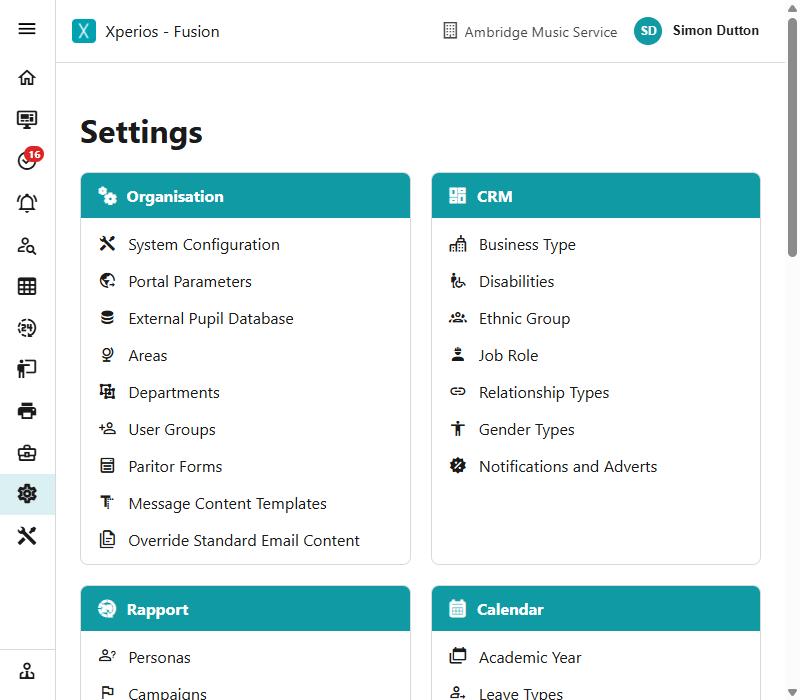
They all behave the same way, so this page covers that once; each section below says what its own lists are for.
The sections
| Section | What it holds |
|---|---|
| Organisation | Who you are, how you are structured, who may do what |
| CRM | How you classify the people you deal with |
| Rapport | Issues, marketing and your library |
| Calendar | Academic years, terms, leave, registers |
| Activity | Service types, subjects, genres, assessments |
| Finance | Charges, ledger codes, VAT, discounts |
| Customer Portal | How activities appear in the catalogue |
| Schools | School categories and types, authorities and wards |
| Teachers | Teaching contracts, faculties, pay scales |
| Resources | Resource categories, groups and locations |
| Appraise | Comments, levels, techniques and disciplines |
How a settings screen works
They all behave the same way, so once you have used one you have used all of them.
A filter box at the top narrows the list — the filtering is done on the server, so it searches everything, not just the rows on screen. Click a row to see it.
Add starts a new record. Edit opens the selected one for changing. Save commits, Cancel abandons.
While you are adding or editing you are working on a draft. Nothing is written until you save.
Unsaved changes are not lost quietly
Try to navigate away mid-edit and Xperios asks first, rather than discarding what you typed.
Deleting, and why it often offers to archive instead
Delete checks whether the record is in use before doing anything.
If it is, Xperios does not simply refuse. It tells you where the record is used, and offers to archive it instead:
"Beginner" is used elsewhere (in tblActivity) and can't be deleted. Archive it instead?
Archiving takes it out of the lists people pick from, while leaving the records that already use it intact and readable. That is almost always what you actually want for something you have finished with — deleting it would damage history.
Restore brings an archived record back.
Why a setting cannot always be deleted
A charge, a subject or a school type is referenced by every record that uses it. Removing it outright would leave those records pointing at nothing. Archive is the safe equivalent, and it is reversible.
Every field on every settings screen
These pages explain what each list is for. For the fields themselves — their exact names, what is required, and which ones appear only when another setting is on — see the field reference.