
Appearance
Somebody is leaving
A pupil is stopping lessons. This is how to end it properly - so the register, the invoice and next year all agree - and what to do when Xperios refuses the date you want.
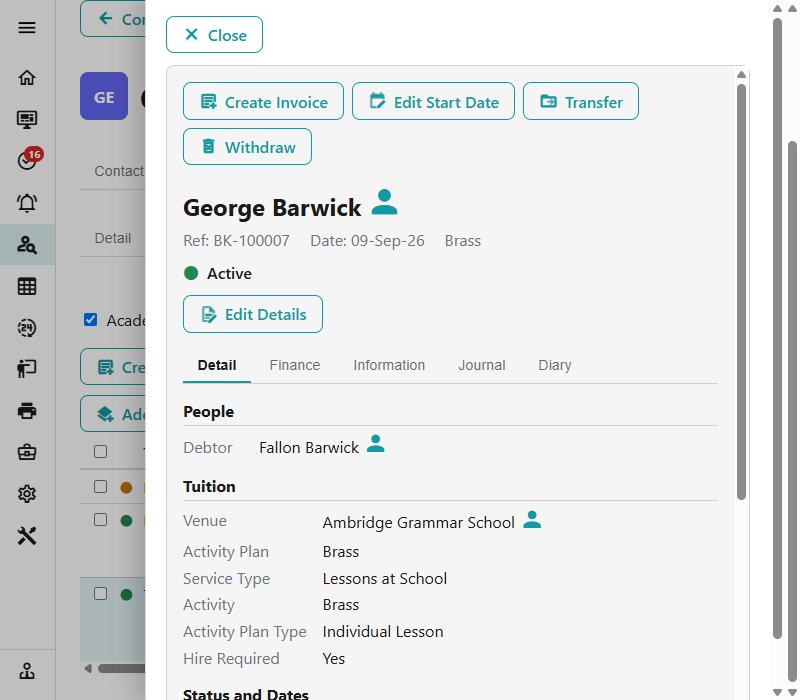
Step 1 of 7
Open the activity and choose Withdraw
Find the activity on the pupil and choose Withdraw. For an instrument the same button is called Terminate Hire. One action does the whole job - the finish date, the lessons after it, the credit and the emails - so there is nothing to tidy up afterwards.
It is offered on a live record with no finish date. If it is not there, the record has already been withdrawn, finished or transferred on.
Use the arrow keys to move between steps.
Why this one is worth knowing
Withdrawing looks like one button, and it is — but three things about it surprise people often enough to fill a support queue: that it is a date rather than a deletion, that a pupil who has progressed needs ending in both years, and that a credit is not a refund.
The form itself heads most of this off, if you read the sentence at the bottom before pressing Withdraw. It tells you the date, how many lessons go, and whether the invoice is credited.
The register-mark refusal is the other one. It reads like an error and it is actually the software protecting a mark somebody has already made.
The same ground, as reference
- Finishing and withdrawing — the full detail, including End Memberships for a whole group
- Giving a payer their money back — when the credit is not enough on its own
- Progression — why last year's withdrawal did not reach this year