
Appearance
A pupil did not progress into the new year
September, and somebody who should be having lessons is not in the new year at all. This is how to find out why - for one pupil or for everybody at once - and what to change so the next run picks them up.
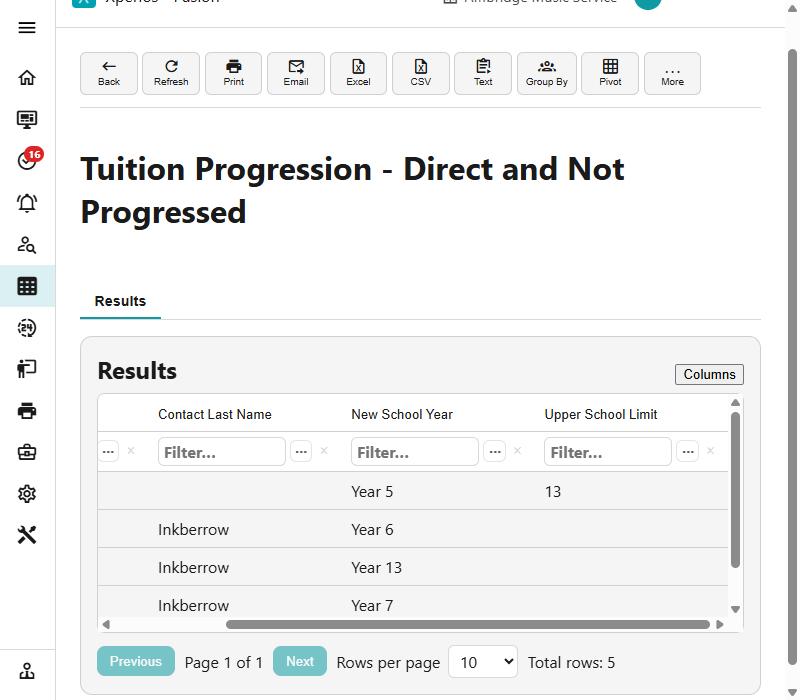
Step 1 of 7
Ask the query first, not the pupil
There are two, and which one you want depends on who is billed: Tuition Progression - Direct and Not Progressed where the parent pays, and Tuition Progression - Indirect Not Progressed where the school does. Either lists everybody who did not come across, for the whole service rather than the one pupil who was reported. It does not spell out a reason, but it carries the columns you need to work one out - New School Year beside Upper School Limit is the pair that shows a pupil who has outgrown their school.
Use Columns to put the list into a shape you can read: the query opens on its id columns, and turning those off leaves the names and the school years. If somebody is not on the list at all, they were not eligible in the first place - usually no active activity in the year just gone.
Use the arrow keys to move between steps.
Why this one is worth knowing
Progression is the September workload, and the thing that makes it hard is that its failures are quiet. A pupil who cannot be placed does not raise an error and usually does not generate an email — they are simply not there.
The query is the answer to that. Run it once in August and once in the first week of term and you will find the gaps before parents do.
The same ground, as reference
- Progression — the conditions in full, and what the payer is asked
- The waiting list — where a pupil progression could not place ends up
- Transfers — moving somebody within a year, and why that is not this