
Appearance
A teacher cannot see or do something
Their schedule is empty, a lesson is missing from it, or a button they expect is not there. Nearly always one of four settings.
Step 1 of 6
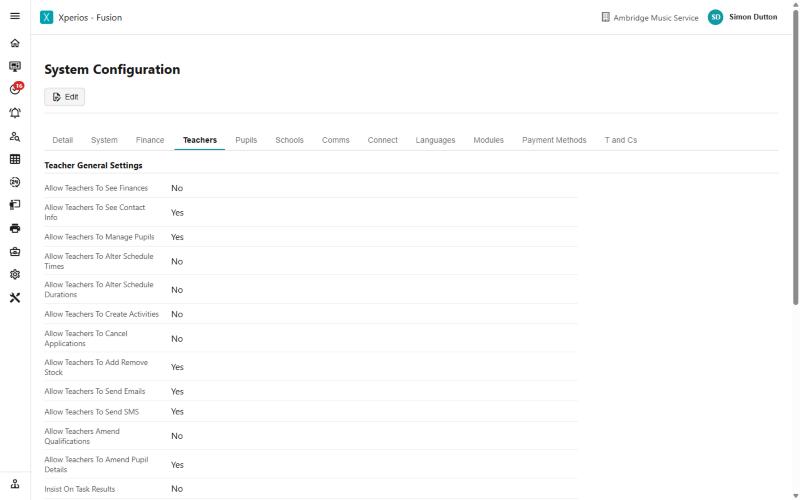
Start with what teachers are allowed to do
Settings > System Configuration > Teachers decides what every teacher can do, for the whole service. Most "a teacher cannot do X" reports end here - altering lesson times or durations, cancelling applications, creating activities, sending email or SMS, amending pupil details and adding or removing stock are each their own switch.
It is service-wide, not per teacher. Turning one on turns it on for all of them, which is usually the thing to weigh before changing it.
Use the arrow keys to move between steps.
Why this one is worth knowing
These arrive as four different complaints and have four different answers, but they sort quickly once you know the order to check in.
Nothing at all on the schedule — the academic year, almost always.
One lesson missing — the plan has not been confirmed.
Cannot save a change — the teacher has no start date.
A button they expected is not there — Settings > System Configuration > Teachers, and it is off for everybody rather than just for them.
The same ground, as reference
- Teachers — the teacher record in full
- Registers — what makes a register outstanding, and who gets chased
- Finishing and withdrawing — ending rather than deleting