
Appearance
A pupil is in the wrong lesson
Moving somebody from one activity to another - and what to do when the Transfer button is not there, which is most of the reason this comes up.
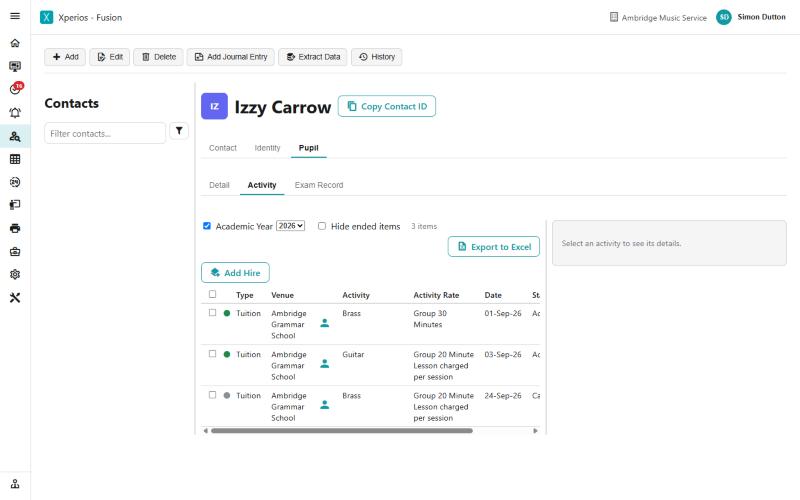
Step 1 of 7
Open the activity and select it
Find the pupil in Contacts, open the Pupil tab and then Activity. You will see every activity for the academic year in the box at the top. Nothing can be done to any of them yet - the panel just says to select one.
Untick Academic Year to see every year at once, and Hide ended items to drop the ones that have finished.
Use the arrow keys to move between steps.
Why this one is worth knowing
Almost every transfer question turns out to be one of three things, and none of them is the transfer itself.
The button looks missing because the row has not been clicked, or because the activity is only Teacher Accepted and so is not in a lesson. The transfer is refused because it crosses an academic year, or because the date is before the pupil started. And the money looks wrong because people go looking for a button that was deliberately taken away - it is automatic now.
Teachers doing their own
Teachers can transfer from the Portal, but only for parent-billed pupils and only where the school and the activity are the same - moving somebody from Tuesday to Thursday, in effect. It is off until it is switched on, under Allow Teachers To Do Simply Transfers in Configuration.
The same ground, as reference
- Transfers — the screen in full
- Progression — moving between academic years
- Finishing and withdrawing — when they are leaving rather than moving